Print Project Planning
You can download your project planning as a PDF directly from the project page.
Download a Planning PDF
- Open the project.
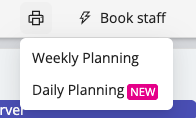
- In the scheduling toolbar, click the printer icon.
- Select the format you want:
- Weekly Planning to display a full week view of the project in a horizontal layout.
- Daily Planning to display a more detailed day-by-day view in a vertical layout, including project and shift notes.
Daily Planning Preview
When you select Daily Planning, a preview opens before you download the PDF. From this preview, you can choose whether to show staff phone numbers in the document.